





HMI Design Agency

HMI Design for Machines and Plants

The people who build a machine see it through different eyes than the people who operate it every day. That is why we start with user research and first understand how your operators actually work. From there we design an HMI (human machine interface) that can be operated safely without training and without a manual.

  • Award-winning HMI design: Red Dot, iF and German Design Award for TRUMPF Touchpoint
  • Over 20 years of UX experience in demanding projects for TRUMPF, Kapp Niles and Reinhausen
  • Learn once, operate anywhere: a design system brings the same operating logic to all your machine types
Operator tapping the touchscreen of a RAMPF dispensing system

Manufacturers in machine building, energy and lab technology trust us

  • TRUMPF
  • KAPP NILES
  • RAMPF Production Systems
  • Reinhausen
  • Uster Technologies
  • Tecan

What is HMI design (human machine interface design)?

HMI stands for human machine interface, the interface between people and machines. Usually it is a touchscreen or operator panel on the machine control. HMI design is the design of this user interface: what information operators see, how they enter values and how they recognise a fault. It brings together four disciplines that we, as an industrial UX agency, combine in one team.

  • User research: observation and interviews at the machine. They show what the workflows really look like and where operation gets stuck today.
  • User experience (UX) design: the operating concept with workflows, navigation and inputs, first as a sketch, then as a clickable prototype.
  • User interface (UI) design: the visual design of the screens with colours, icons and controls, so that what matters stands out first.
  • Design system: rules and components that make every one of your machines operate the same way. Anyone who knows one finds their way around all of them, and your development team works more efficiently.

UI Design

Interfaces you won’t forget

Innovative in look, intuitive to operate. From sci-fi HMIs to 3D digital twins, these are our visually strongest projects. Each one is designed for real displays on real machines, with usability as the benchmark. Learn more on our UI design page.

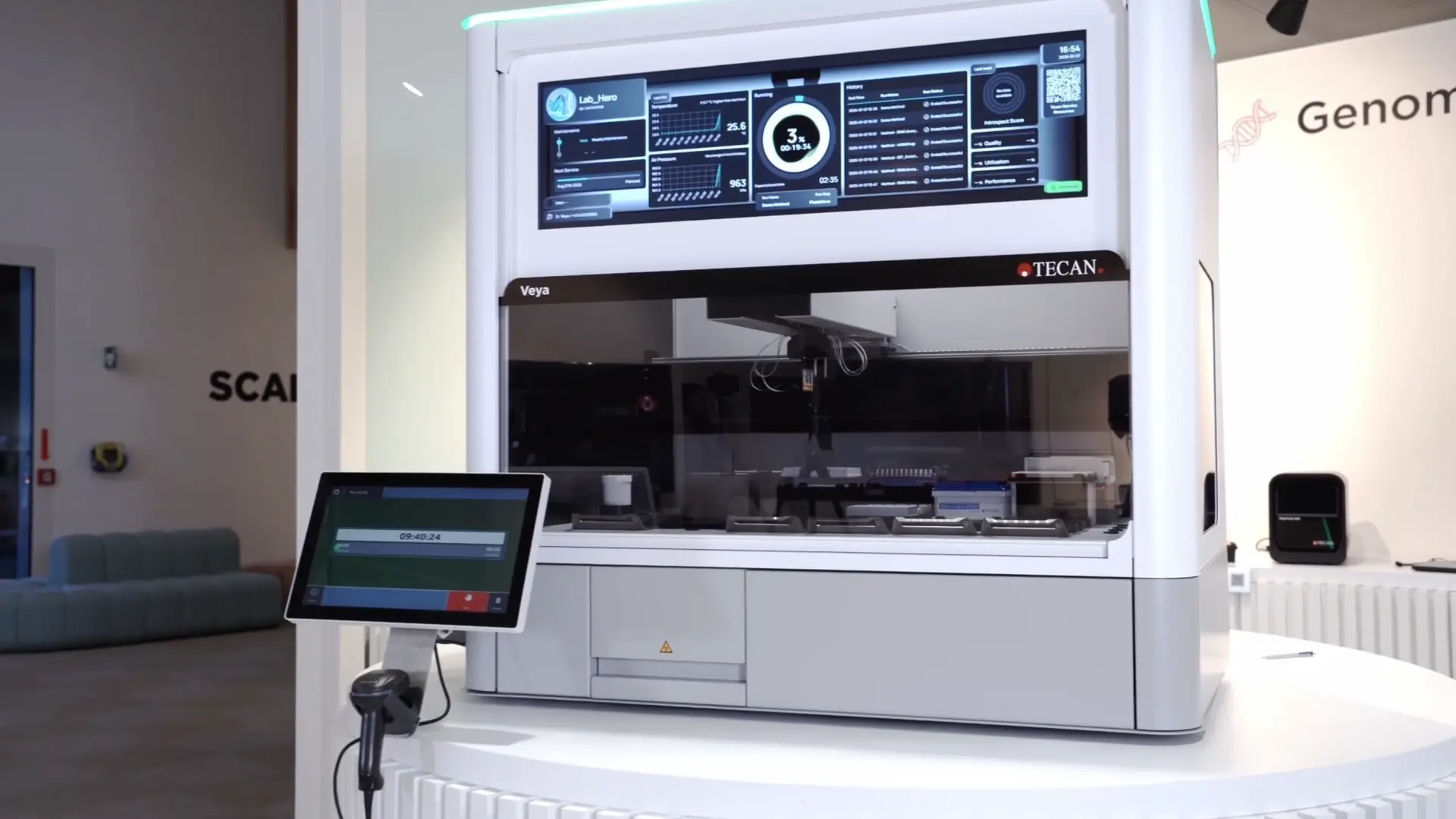
  • Tecan Veya with the OneView dashboard
    Lab automation: OneView dashboard for Veya
  • MR control panel with a 3D digital twin on a dark grid
    HMI redesign with a 3D digital twin
  • TRUMPF bending HMI with gesture control
    Award-winning HMI design system
  • Operator at a GEA HMI in food production
    One operating concept for food processing machines
  • HMI of a RAMPF dispensing system
    HMI for dispensing systems
  • SEW-EURODRIVE DriveRadar for energy management
    Industry 4.0: gamification in production
  • AR glasses on the shop floor in the Festo DeepSight project
    DeepSight AR operating concept
  • Isometric view of the Uster screens
    Service framework for textile mills
  • Kapp Niles dark user interface with gear data
    Precise HMI for gear grinding machines

Typical challenges

When professional HMI design pays off for machine builders

In global competition, many machines are now technically on a par. What sets them apart is how they are operated, and operation is a funny thing: as long as it works, nobody talks about it. It only gets noticed when new operators take a long time to learn the machine or an unclear error message brings the line to a halt. For manufacturers, that means more service calls. For companies running the machines, it means more downtime and scrap. These situations show where good machine operation pays off.

Every machine type is operated differently

Operating concepts that grew over the years differ from machine to machine. Your staff have to rethink every time, and training takes longer than necessary.

Faults are hard to recognise

Error messages are worded technically, and the display does not show danger zones. Without expert knowledge the cause is hard to narrow down.

Too much information on one screen

Process values, parameters and system messages compete for space. What matters gets lost, and input takes too long.

Every team builds its own UI

Developers keep re-coding similar controls, and icons and colours look different on every machine. A style guide PDF changes little about that.

New staff need to work safely, fast

Skilled workers are scarce, and more career changers operate the machines. The HMI has to guide them through the task without assuming experience.

The machine is connected, the HMI is not

Remote access, mobile devices and IIoT data call for an operating concept that goes beyond the operator panel on the machine.

Success story

One HMI design system for many machine types

TRUMPF Touchpoint HMI Design System

TRUMPF Touchpoint HMI Design System

TRUMPF builds bending, laser and punching machines, among others. Operators should be able to move from one machine to the next without relearning. Together with TRUMPF we developed the Touchpoint HMI Design System: shared operating rules and components based on .NET and WPF, from which the teams build the interfaces of the individual machines. It includes multi-touch gestures such as pinch-to-zoom, 3D models you rotate with a swipe, and help via a two-finger tap.

  • One platform for the user interfaces of different machine types
  • Red Dot 2016, iF 2017, German Design Award 2018 and German Brand Award 2018
View the TRUMPF project

Services

UX and UI design engineering for industrial HMI solutions

Design engineering at Centigrade means that user research, UX design, UI design and frontend engineering work in one team. We support your HMI from the first operating concept to implementation in your software, and the interface reaches the machine exactly as we designed it.

User research at the machine

What operators say about their work and what they actually do are often two different things. So we observe your users' tasks, roles and workflows right at the machine. A few short psychological in-depth interviews then show why a step goes wrong.

User research

HMI concept and prototype

We design navigation, input methods and feedback as a clickable prototype and test it early with your operators, while changes are still cheap.

UX design

Visual design

We arrange colours, icons and controls ergonomically by what operators need first. The result is a distinctive HMI that fits your brand.

UI design

One operating logic for every machine

A design system of rules, tokens and components means every new machine is operated the same way. For TRUMPF, this became the Touchpoint HMI Design System, which gives bending, laser and punching machines the same operation.

TRUMPF project

Frontend engineering and integration

Our engineers implement the design to fit your software architecture, for example in .NET and WPF or with Angular and other web technologies.

Software modernization

Working within your process

We join your development process, whether Scrum or SAFe, on site or remote. If you wish, we support your HMI beyond the first release.

Product management

User research: we get to know your operators

Before we design the first screen, we get to know the people who operate your machine. For Reinhausen we started the project with a workshop in which user research, UX design and prototyping worked closely together. The results were personas like this one and a concept that lets operators find faults quickly in the 3D model of the plant.

Persona from the user research for the Reinhausen HMI

What our clients say

Working with Centigrade was a real game changer for us in developing the new plant visualisation for the GRIDCON® STATCOM MMC. […] The technical implementation impressed us just as much: thanks to clean interfaces and high-performance rendering, the ready-to-integrate Angular components slot seamlessly into our core software.
Thomas Röseler Thomas Röseler Head of Innovation & ProjectsReinhausen
In the style definition workshop, we chose a modern and groundbreaking style for our new HMI software. The goal was to achieve a clear presentation and intuitive operation by the user despite the vast amount of information required. In the short, very effective and committed collaboration with Centigrade, we were able to develop a first release in the short time available.
Hartmut Storz Hartmut Storz Managing DirectorRAMPF Production Systems
[…] Centigrade now supports us in all areas, from concept to visual design, implementation and user testing, and we would not want to be without their expertise.
Heike Thomys Heike Thomys Product Manager Mill Management SolutionsUster Technologies
The collaboration between Tecan and Centigrade has not only produced a graphical representation of information, but has also resulted in genuine innovation. Because OneView is unique, Tecan has decided to protect OneView as an ‘animated product design’ (design patent).
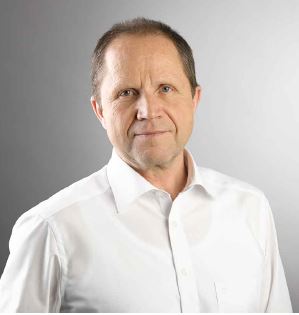
Dr. Werner J. Hälg Dr. Werner J. Hälg Vice President Global Intellectual PropertyTecan

Planning a new HMI or a redesign?

In a no-obligation initial call we clarify your situation: machine types, operators, existing software. Afterwards you know which first step is worth taking.

How does an HMI project work? From workshop and prototype to the same operation on every machine

Our design process leads from the first conversation to the rollout across your machine family. How long each step takes depends mainly on the number of machine types and screens.

Initial call

You describe the machine, operators and goal. Result: a proposal for getting started, with scope and duration.

Scoping workshop and user research

In the scoping workshop, product management, sales, service and development sit at one table. Together we clarify the business case, user groups and usage scenarios. User research at the machine then shows where operation falls short today. Result: a project definition everyone stands behind.

HMI concept and prototype

The operating concept and visual design become a clickable prototype that we test with operators. Result: a validated concept.

Design system and implementation

Components and rules go into your software, and our engineers support the integration. Result: an HMI that looks on the machine the way it was designed.

Rollout to further machines

We transfer the design system to further machine types and support new features. Result: one operating logic for your entire machine family.

Consistent controls on every machine

A style guide document changes little as long as every team keeps coding its own HMIs. Developers then keep writing similar code, and icons are used inconsistently. "The new interface is more modern and tidier, but it misses the actual workflows" is something we often hear from operators.

That is why we first describe the usage scenarios at the machine and only then talk about colours, layout and controls. We deliver the design rules as ready-made components, for example in XAML or HTML, that your developers use directly. New screens and machines are built on the same foundation, and the design system grows with your product family. Why a design system alone is not enough is explained in the article Is it enough to create a design system?

Screens from the Tecan style guide: one design system for several devices

Precision starts at the controls: HMI design for Kapp Niles

Kapp Niles builds machines that process gears and profiles up to eight metres in diameter to a thousandth of a millimetre. At this level of precision, the result depends heavily on operation. Drag and drop, fast data entry and clear feedback therefore make operation precise and safe. In its new dark look, the HMI shows the machine as a digital twin that closely mirrors the actual machine.

More HMI projects in machine building, energy and lab technology

From gear grinding machines and dispensing systems to energy technology and software for diagnostic labs.

Standards and ergonomics

DIN EN ISO 9241, ISA-101 and accessibility in HMI design

An HMI has to meet standards and work in everyday shop-floor conditions, including with gloves and changing light. At the start of the project we clarify which safety and ergonomics requirements apply to your machine. In usability tests we check whether the concept meets them in daily use.

DIN EN ISO 9241-110

The standard describes the principles of interaction, such as suitability for the task, conformity with user expectations and robustness against use errors. We use it as a review grid for concept and prototype.

ISA-101

The standard for HMIs in the process industry governs how alarms, states and process values are displayed. Its idea of using colour mainly for deviations also helps on machine tools.

Accessibility

For us, accessibility is more than an obligation. From interviews with visually impaired people and our own accessibility tests we know what matters: enough contrast, status indicators that do not rely on colour alone, and touch targets you can hit wearing gloves.

A look ahead

HMI in space: controls in 3D and virtual reality

The fastest way to understand a plant is to stand inside it. For SEW-EURODRIVE we rebuilt their Hannover Messe 2016 booth as a virtual hall, with automated guided vehicles, assembly stations and a robot arm. Look around yourself in the 360° video.

Virtual SEW-EURODRIVE booth: assembly station with shelves and an automated guided vehicle

The start view shows a gearbox assembly station (“gear unit assembly module, sequence 2”): shelves with red small-parts bins and boxes, an SEW-EURODRIVE automated guided vehicle in front and a red train behind it.

All around are further assembly stations, an orange robot arm on an automated vehicle and open driving lanes in a large, bright hall. Automated guided vehicles connect the stations. The video has no sound.

Frequently asked questions about HMI design

What is an HMI?
An HMI (human machine interface) is the user interface through which people control and monitor a machine or plant. It can be an operator panel with a touchscreen on the machine, a plant visualisation in the control room or an app on mobile devices. Control manufacturers such as Siemens also call the operator panel itself an HMI.
What types of HMIs do you design?
Operator panels and touchscreens directly on the machine, desktop software for control rooms and plant visualisation, web HMIs in the browser and apps for remote access. For service and maintenance we also design augmented reality applications.
What is the difference between HMI design and UI design?
HMI design is user interface design for machines and plants. It answers questions a website rarely has: How do operators recognise a fault? Where are the danger zones? What happens when someone operates it wearing gloves? More on interfaces in general is on our UI design page.
How much does HMI design cost?
That depends on the scope: how many machine types and screens, and whether you need concept and design only or also a design system and implementation. After the initial call you receive a transparent quote, split into phases if you wish.
What is the best way to get started?
With an initial call. Afterwards we suggest a starting point that fits your situation: a workshop with user research at the machine, a UX audit of your existing HMI or a pilot project with one machine type that can later be transferred to further machines.
Which technologies do you work with?
With the technology your HMI software uses or is meant to use in the future, for example .NET and WPF for desktop HMIs or Angular and other web technologies for web HMIs. We transfer design tokens from Figma directly into code so that design and software match.
Do we get a design system we can keep working with?
Yes. You receive the component library, design tokens and documentation, for example in your Confluence. Your developers use them to build new screens on the same foundation, and we remain available for new machines or larger extensions.
Is a redesign of our existing HMI worth it?
Often yes, if faults can only be found with training, every machine looks different or new features no longer fit the operating concept. A UX audit shows where the HMI struggles today and which changes bring the most. More on renewing existing software is on our software modernization page.
Do you work within our development process?
Yes. We fit into your way of working, whether Scrum or SAFe, and work on site at the machine or remotely with your team.

Book an initial call about your HMI.

Tell us about your machine and your operators. In a no-obligation initial call we look at your HMI together and suggest a first step.

Book an initial call about your HMI
Please enter a valid email address.
Please enter a message.
Please agree to the privacy policy.