

When legacy software becomes barely maintainable, the desire for a radical fresh start quickly emerges: tear it all down, build it all new, do it right this time. In the first part of this series, Thomas Immich outlined the vision of an AI agent that transforms outdated legacy systems into modern, well-maintainable applications with a compelling user experience. The key point: even problematic legacy systems contain something valuable. They already encode implemented requirements. How to systematically recover those requirements from existing systems and derive an AI-supported, user-centered modernization process from them is what I’ll show in this second part.
When Modernization Is the Right Path
When adding features and fixing bugs in your own software starts to feel like a game of Jenga, when sprint planning keeps turning up the proverbial bomb and even minor changes trigger multi-sprint chain reactions, it’s clear: the system is under pressure. The obvious question then isn’t just how to stabilize it, but also whether it’s worth investing in at all. Wouldn’t a complete rebuild be more consistent?
The answer is unspectacular but important: it depends.
With a small user base, the risks of a radical cut may be manageable. But with a large user base, the risks increase significantly. Even small changes are noticed, especially by power users, because they affect established routines, shortcuts, and mental models. Failing to involve these people sufficiently risks acceptance problems precisely where the system is used most intensively in daily work.
There’s another factor: software development is expensive. Modernization offers the opportunity to consciously manage risks and costs, because not everything has to be replaced at once. Instead, functional areas can be prioritized, validated, and renewed step by step.
This allows users to be brought along early. At the same time, it reduces the risk of developing a new system over a long period that ends up looking modern but misses real usage requirements.
The strongest argument for modernization, however, lies in the long-term reduction of costs for further development and maintenance. Positive effects for marketing and sales through a visibly modern application are an added benefit, but they shouldn’t be the sole driver.
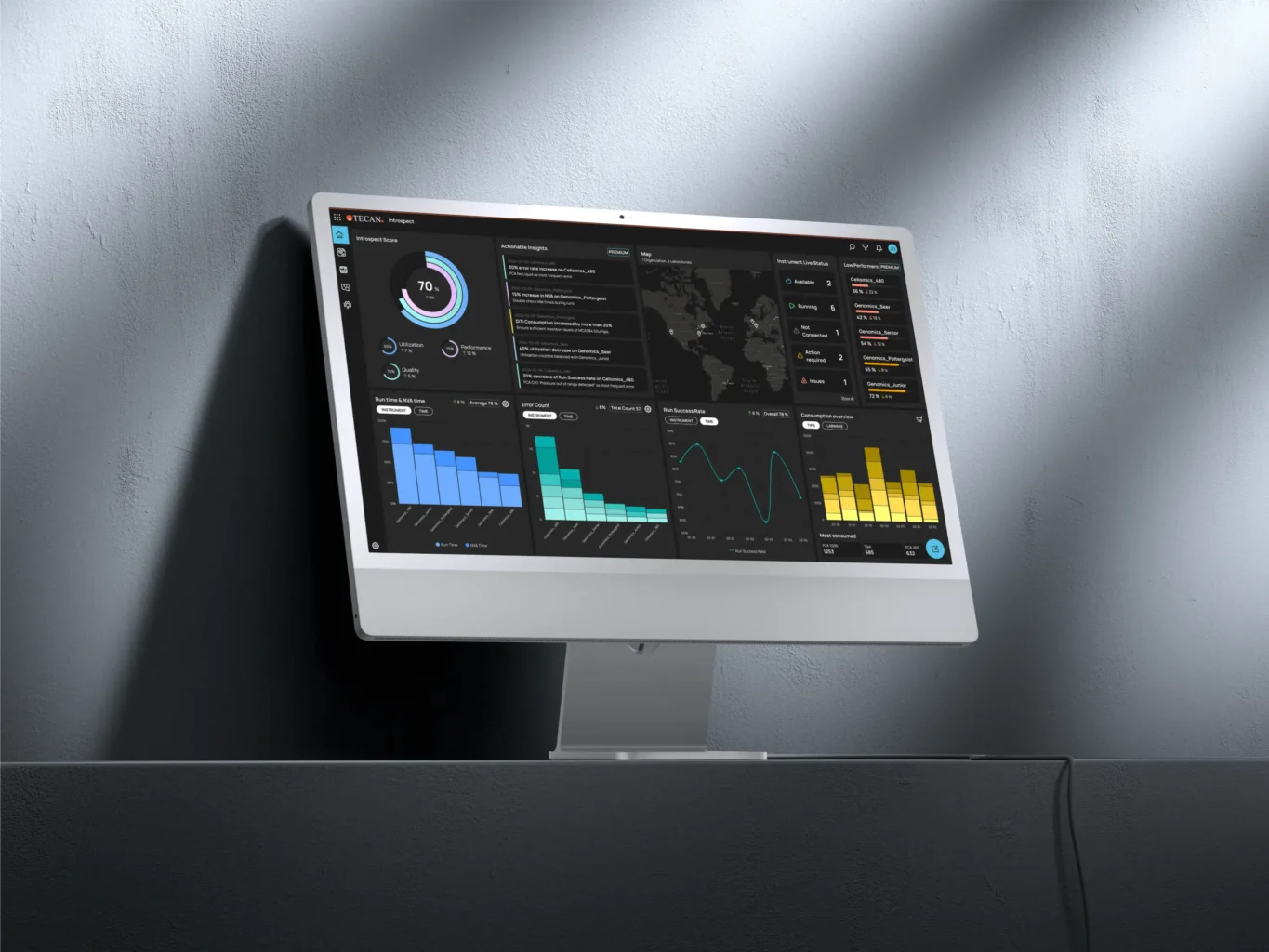
Figure 1 — Good UI design contributes significantly to UX, as illustrated by Centigrade’s work for Tecan Introspect. (https://links.centigrade.de/en/references/intuitive-data-visualisation-laboratory-software). But good UX depends on further factors beyond design.
What matters most is working cleanly throughout the entire process, from requirements analysis to shipping modernized software components. Good requirements management helps define sensible packages and set the right focus. Prototyping and usability testing help ensure you’re not just building something new, but building the right thing. And a design specification that is “AI-ready” ensures that current AI tools can support efficiently without sacrificing quality or traceability.
That alone, however, doesn’t guarantee the application won’t become another hard-to-maintain Frankenstein system. Especially with tools like Mistral, Claude, Copilot, Codex and the like, features are generated quickly, pull requests are opened fast, and the next development step is kicked off in no time. Using that speed advantage without clear architectural and quality guardrails means potentially working directly toward the next modernization.
Modern language models should therefore not be understood as a shortcut around the process, but as an accelerator within a good process. Deliberate architecture and technology decisions are central to this. A modern tech stack that is actively maintained and allows interchangeable components is a foundation for maintainability. Suitable frameworks, libraries, and standards such as Angular Material, React, Vue.js, or Three.js can support rapid feature development without diluting the architecture. Visual customizations become easier through Tailwind CSS or Framer Motion. And future AI-powered concepts for onboarding, help, or dedicated workflows with AI agents and MCPs can be integrated more quickly when the architecture is prepared for them.
Modernization remains complex. But with a structured, incremental approach, that complexity becomes manageable: user-centered, technically sound, and with a clear view of the risks.
How to Extract Requirements from Legacy Systems
When structuring the modernization of a legacy system, the focus, as with any new development, should be on user requirements. They reveal which areas of the software are genuinely important from a usage perspective. This perspective should largely determine where functions are added, improved, or deliberately left unchanged. Because the value of software doesn’t come from the quantity of its features, but from how well it supports real tasks. That’s precisely why this perspective is also decisive for the ROI of UX based on professional human-centered work.
Of course, understanding where the greatest technical debt lies is also relevant. But technical debt alone doesn’t answer the prioritization question. Why refactor an area used once a month when another area is slowing down daily work or generating errors?
What we’re looking for, at minimum, is the 80-percent case: the areas where daily work actually happens. That’s where modernization has the greatest impact on users, productivity, and acceptance. This knowledge makes prioritization decisions more robust and helps place investments where they’ll have real effect.
How do we find out which parts of the software are used how often? Through usage data analysis. It shows which functions are most relevant, where problems occur, and where changes are particularly sensitive. In practice, we use established tools like Kibana, Matomo, or Google Analytics so that modernization decisions are based not just on gut feeling, but on solid data.
At the same time, a picture emerges that is also central to revising and redesigning UI concepts: which users use which functions, in what context, and toward what goal? This combination of behavior, context, and goal forms the foundation for good UI design.
Why Vibe Coding Alone Isn’t Enough
Once the relevant usage data is available, the next step can seem deceptively simple: clean up the context, feed AI tools with requirements and architecture notes, and generate an implementation plan as quickly as possible. With good context engineering, surprisingly plausible-sounding proposals can indeed emerge very quickly.
But this is exactly where the critical boundary lies. The risk-minimizing effects of modernization only reliably materialize when “forward engineering” is carried out cleanly after “reverse engineering” the requirements. Users must be deliberately involved, and UX must not merely function as a surface-level promise. It must genuinely be embedded in the requirements, the concept, the interaction, and the implementation.
A clean forward engineering process also creates the ability to respond to market shifts, technological developments, and changing user expectations. These insights can then deliberately flow into the modernized components. Technology and architecture decisions should be based on validated design, which in turn should emerge from validated requirements.
Only when human intervention, expert judgment, and quality assurance are embedded in this process can AI meaningfully accelerate the overall workflow.
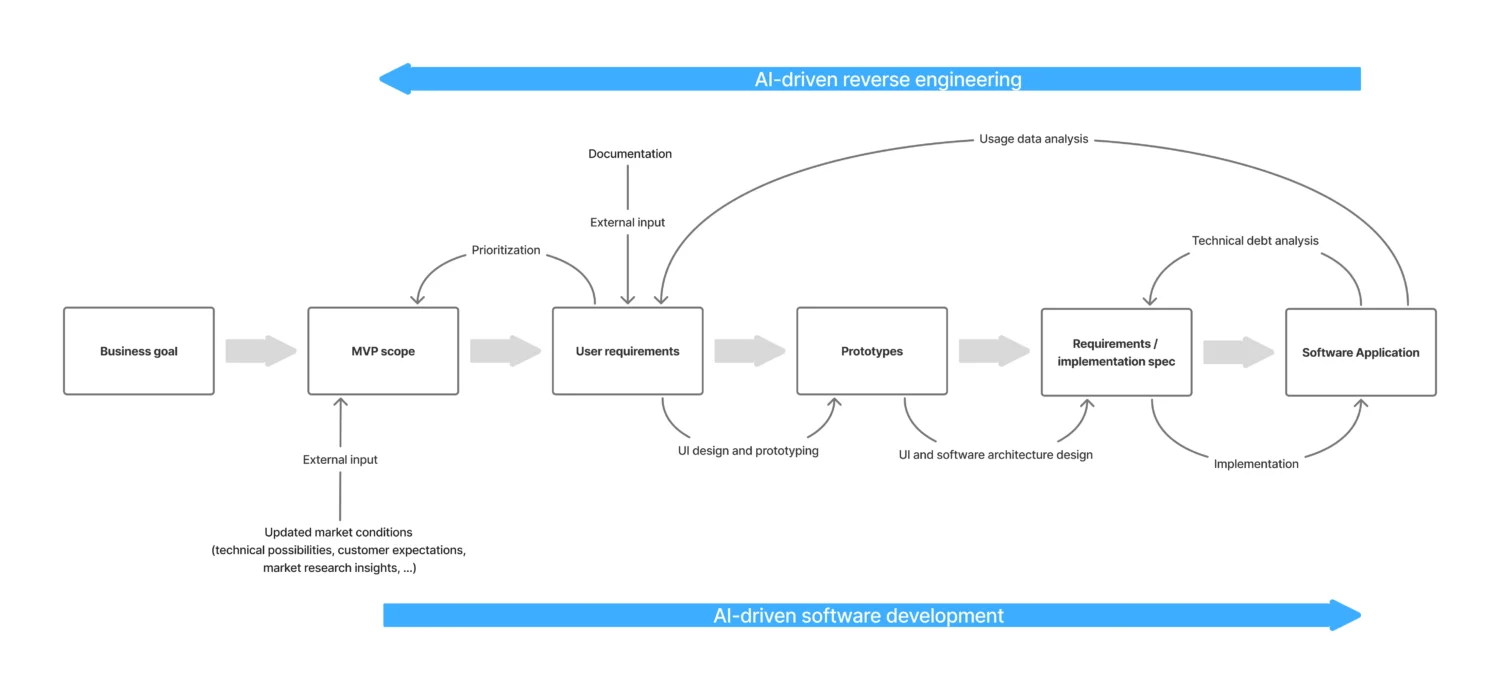
Figure 2 — User-centered software modernization
Where AI Supports the UX and Software Development Process
Current language models (as of April 2026) are already highly capable and developing rapidly. They become especially effective not in isolation, but in combination with automation, for example with n8n. This combination offers several advantages over using individual AI tools alone:
- It saves tokens and therefore costs and resources. Only this makes true scalability possible, without agents becoming token-burning machines.
- It reduces dependency on a single language model and enables selective use of different systems to produce reliable, efficient, and high-quality output. Sensitive parts can be processed with local models where needed.
- It gives people control over the process, particularly through deliberately placed breakpoints where experts make decisions.
This is especially relevant in the early phases of the software development process. That’s where requirements and UI designs are validated and implementation-ready specifications are created that are usable by both humans and AI-powered implementation.
At Centigrade, AI in combination with automation already supports work across a range of task areas. The following list is intentionally not exhaustive, but shows where practical benefits are already visible today:
UX Research
- Analysis and validation of user needs
- Creation of AI personas from data collection or deep research
- Qualitative coding
- Usability testing with computer-using agents
- Generation of interview guides
- Persona segmentation
- Persona conversations
Concept Design
- Generation of flow charts
- Wireframe brainstorming
- Generation of scenario maps
- Concept specification
Visual Design
- Generation of screens (see Figure 2 for an example)
- Design specification
Prototyping
- Generation of clickable prototypes
Specification
- Requirements specification
- Further development and maintenance of design systems
- UI kit
- Design guidelines
- Component library
In addition, there is the already-mentioned support in software engineering, for example in planning, implementation, testing, delivery, and bug fixing.
One concrete example is automated screen creation in Figma (see Figure 3), as of February 2026, and entirely without the Figma Remote MCP. Input is provided by personas, scenarios, and user needs that were automatically generated from qualitative survey data. We curate these results and hand them off to Claude Code, which then independently creates Figma screens via a local MCP and corresponding n8n workflows. The result is efficiently generated, editable screens that provide a solid foundation for brainstorming and directional decisions.
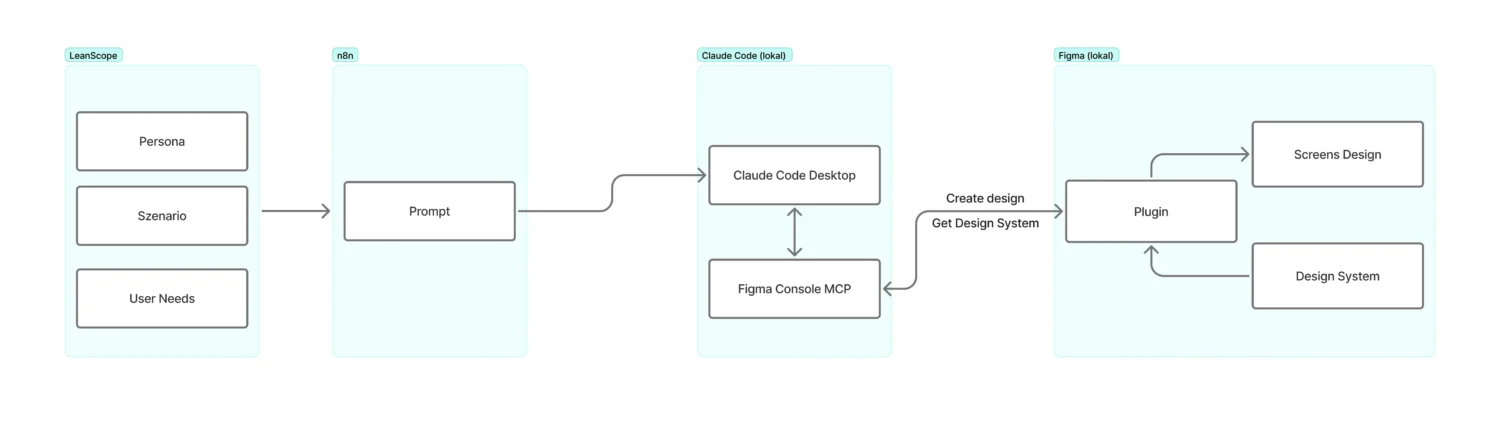
Figure 3 — Information flow for automated screen creation in Figma using AI, based on user needs and user context
The Role That Humans Retain
Modernizing a legacy system can deliver significant value with or without AI support. But that value only becomes reliable through a clean process, led by people who deploy AI deliberately. Because there’s one area where human expertise remains central: critical judgment.
No matter how carefully you prepare the AI context, there are decisions that require professional assessment, experience, and accountability. Two examples:
- Prioritizing features at the intersection of usage data, current stakeholder requirements, and strategic business decisions
- Assessing the quality of interim results against the backdrop of the usage context, the project and company architecture, and the interests of all project and product stakeholders
It follows that the orchestration of AI agents should ultimately rest with people. Only then can AI support be integrated into the overall process in a project-pragmatic way, with an adoption pace that accounts for technical complexity, costs, and organizational maturity.
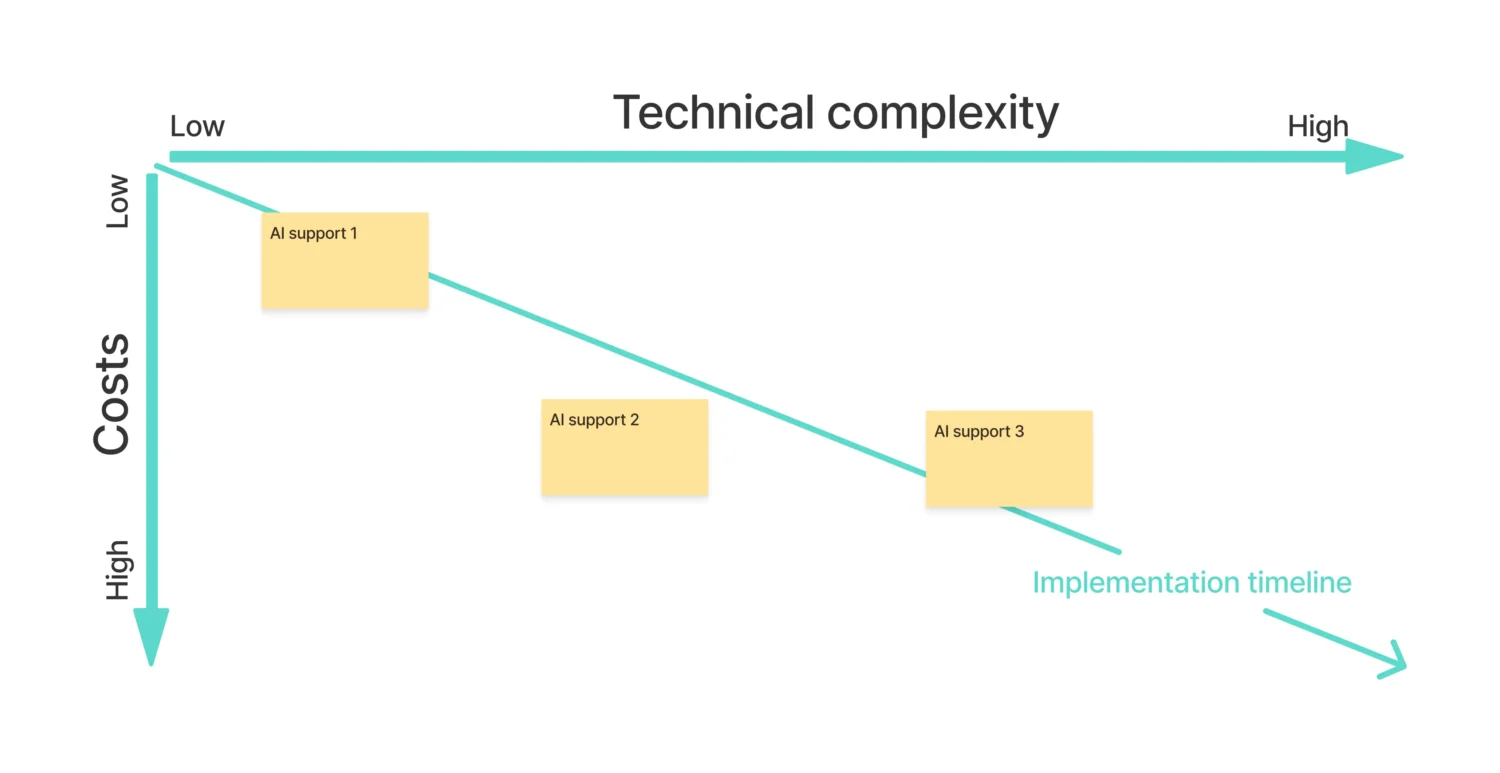
Figure 4 — Plan for introducing AI support into the software development process
AI can accelerate modernization. But user-centered modernization only emerges when that acceleration is consciously guided and understood by the people on the team.
Modernization therefore doesn’t mean replacing a legacy system with something new as quickly as possible. It means taking the knowledge embedded in the existing system seriously, carefully working out usage requirements, and connecting technical renewal step by step with real product impact. AI can accelerate, structure, and relieve that process at many points. But what remains decisive is that modernization is led deliberately, with clear priorities, validated decisions, and a consistently user-centered view of what change actually creates value for users, teams, and the organization.
