

Why Modernization Matters
Across industrial and enterprise environments, legacy HMIs, desktop-based UIs still drive many mission-critical processes. These systems often perform reliably, but their technical foundations date back decades, making them increasingly hard to maintain, extend, and adapt to today’s user expectations.
UX improvements in such systems often reach a hard limit – not because of design talent, but because the underlying technologies can’t support modern interaction models, responsive layouts, or cross-device usability. Meanwhile, the web ecosystem continues to evolve rapidly, bringing cutting-edge frameworks, design systems, and integration standards that define what users now consider a natural experience.
By adopting modern web technologies – from reactive frameworks and micro-frontends to embedded browser engines – companies can meet today’s user expectations for accessible, collaborative, and visually consistent applications across devices. These technologies open a smooth, step-by-step path from legacy systems toward a modern foundation, allowing teams to evolve interfaces and functionality without interrupting ongoing operations. The result is a user experience that feels current, cohesive, and future-ready while preserving the proven reliability of existing software.
Understanding the Legacy Landscape
Before choosing the right modernization path, it’s essential to understand what we’re modernizing. Many industrial and enterprise systems today are built on WPF, WinForms, and monolithic .NET backends – or on legacy web applications that rely on older frameworks like ASP.NET WebForms, jQuery-heavy frontends, or server-side rendering architectures. These solutions have served reliably for years, often carrying valuable business logic that’s deeply integrated with hardware or backend systems – which makes any structural change feel risky.
In industrial desktop environments, our company over the years provided comprehensive UX concepts and custom WPF UI component libraries that could be integrated directly into customers’ applications. This approach enabled customers to enhance and standardize their user interfaces, improving consistency, maintainability, and overall user experience while staying within their established architectures.
However, the hardware dependencies, limited UI frameworks, and outdated interaction models of both desktop and web monoliths still stand in the way of modern UX expectations. The challenge is not just technical but strategic. In most cases, business continuity simply doesn’t allow for a complete rewrite – shutting down development for months or even years to start from scratch isn’t an option. Production must go on, users must be supported, and systems must keep running.
That’s why modernization needs to happen in motion – like building new rails while the train is still moving. The goal is to evolve the existing system step by step, integrating modern technologies without breaking what already works, and finding the right balance between stability and innovation.
Choosing the Right Modernization Path – Injecting Modern Web into Legacy Applications
There are many ways to modernize legacy software – from backend refactoring to introducing microfrontends, cloud APIs, or even full system rewrites. But in most real-world scenarios, the most effective and least disruptive path is to extend what already exists instead of replacing it overnight.
When the existing system is a desktop application (for example, an old .NET WPF or WinForms app), the practical approach is to embed a modern web application inside the legacy shell. This way, new features can be built as web-based modules – Angular, React, or Blazor – and displayed right within the existing UI. The desktop host and the embedded browser can communicate through several mechanisms, such as Inter-Process Communication (IPC), shared local APIs, or JavaScript-to-.NET bridges, enabling smooth data exchange between the two layers.
If the existing system is already a web application, the same principle applies, but the right tool could be different – microfrontends. They let teams introduce new web modules alongside the old ones, gradually migrating screens and features without breaking the overall application.
Technically, several rendering engines enable the integration of web content into desktop software.
For existing native applications, the Chromium Embedded Framework (CEF) is the most common choice – typically used through language-specific bindings such as CefSharp for .NET, JCEF for Java, cefpython3 for Python, CEF native API for C++ and others. These solutions allow developers to embed modern web modules directly into legacy shells while maintaining full control over the hosting environment.
When starting a new desktop project from scratch, options like Electron or native WebView controls (Edge WebView2 on Windows, WebKit on macOS/Linux) provide a different approach — offering a full desktop experience built primarily around web technologies.
Choosing the right one depends on how tightly you want to integrate the web layer, how much of the existing codebase you plan to keep, and what platforms the application must support. But the principle remains the same: inject modern web technology into the legacy system step by step, keeping the business running while the product evolves.
The Seamless Path to Modern UX
The Core Idea
Modernizing doesn’t have to mean rebuilding.
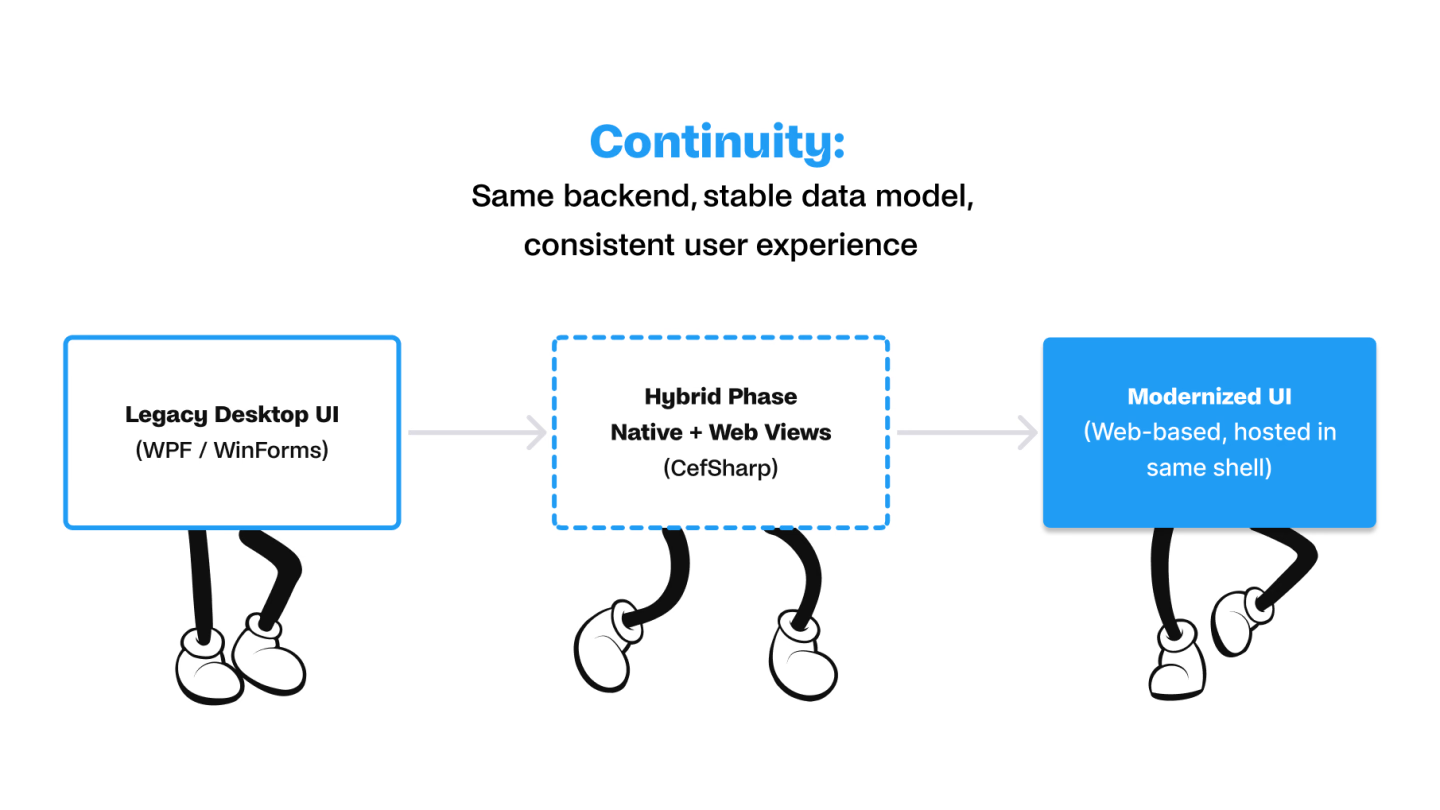
The core idea is simple: embed a modern web frontend inside the existing desktop application.This allows teams to introduce Angular or React modules gradually, replacing specific screens or features one by one.From a user’s perspective, the transition feels seamless — the same application suddenly has modern animations, responsive layouts, and up-to-date interaction patterns, while keeping all existing workflows intact.
The user doesn’t see “two systems” — only one evolving interface.
How It Works in Practice
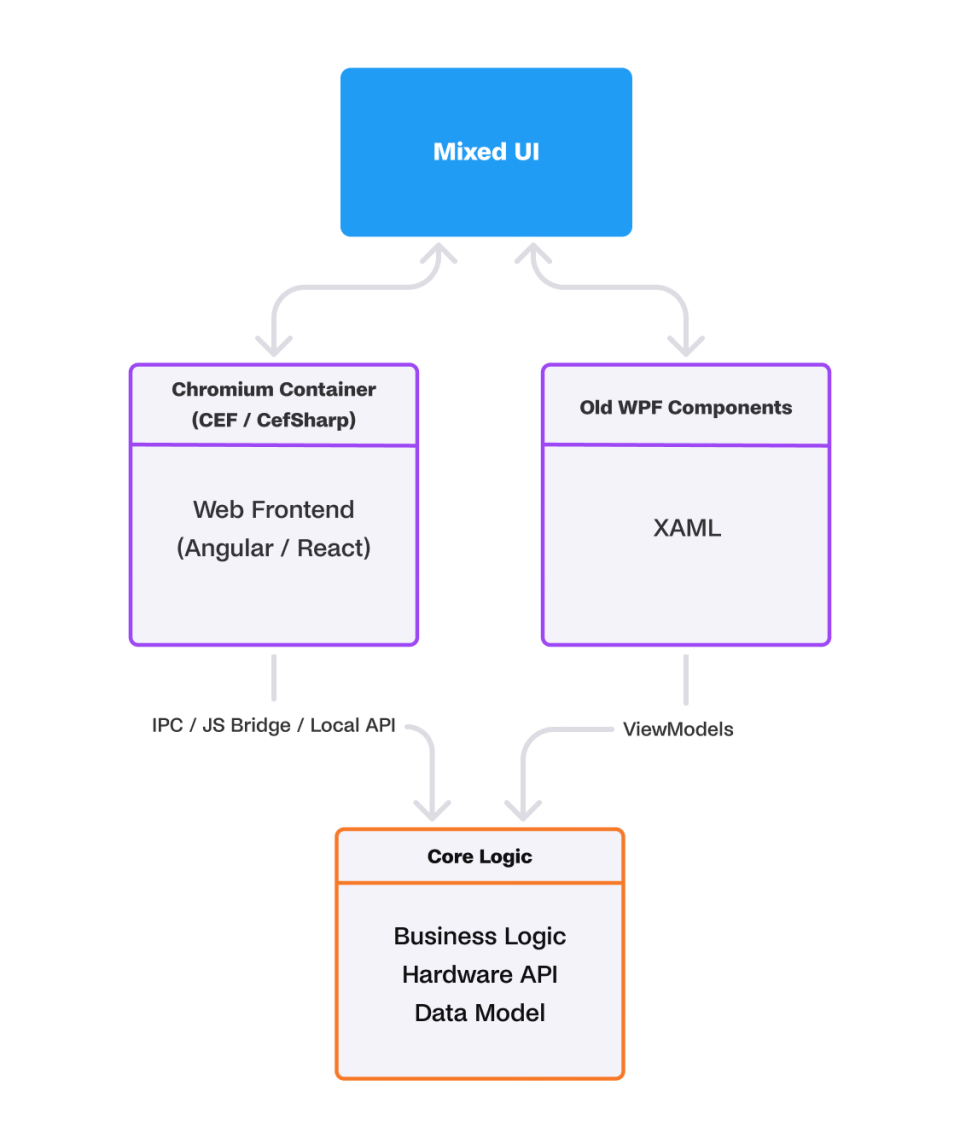
Under the hood, the legacy host application continues to manage the main business logic, while the modern web frontend handles visualization and user interaction.
The desktop layer (e.g., WPF or WinForms) still runs the domain logic, backend communication, and device integration.
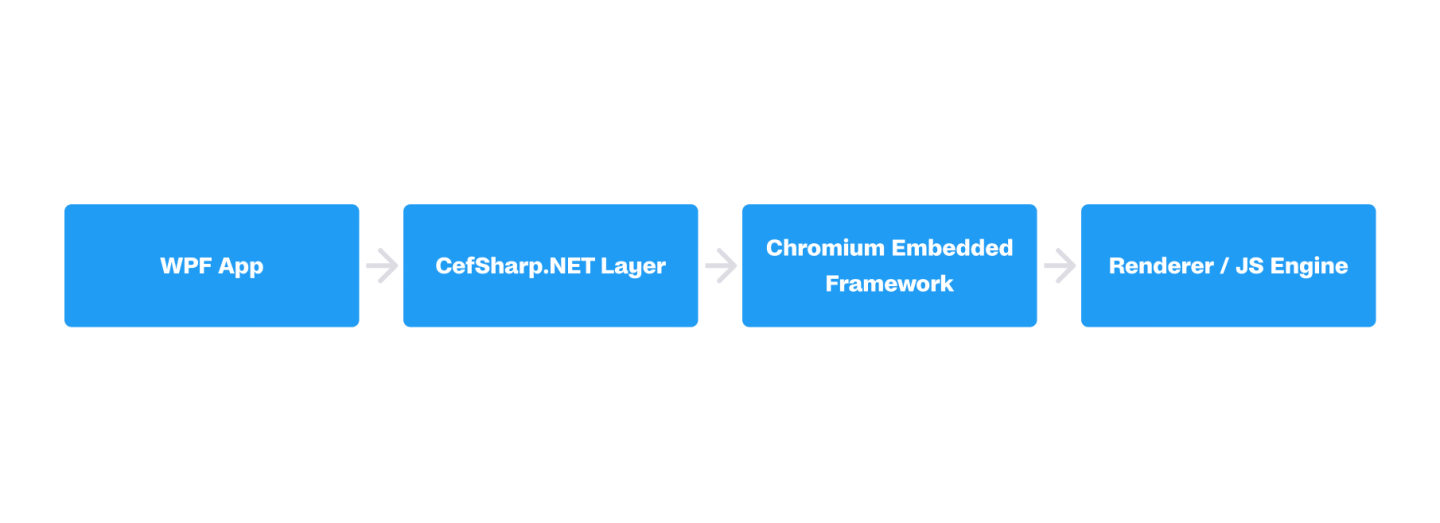
The embedded Chromium instance (via CefSharp) renders Angular or React components locally.
Both sides exchange data through a JavaScript–.NET bridge, ensuring fast, secure communication.
This hybrid structure allows development teams to add, test, and roll out modern UI features independently — without disrupting the existing codebase.
Benefits
- Seamless UX transition — users stay familiar with the environment while UI evolves.
- Low risk — legacy modules remain functional during modernization.
- Reusability — the new web modules can later be reused in browser-based dashboards or PWAs.
- Parallel development — teams can work on new Angular/React features without touching legacy code.
The User Perspective — A Familiar App, Just Better
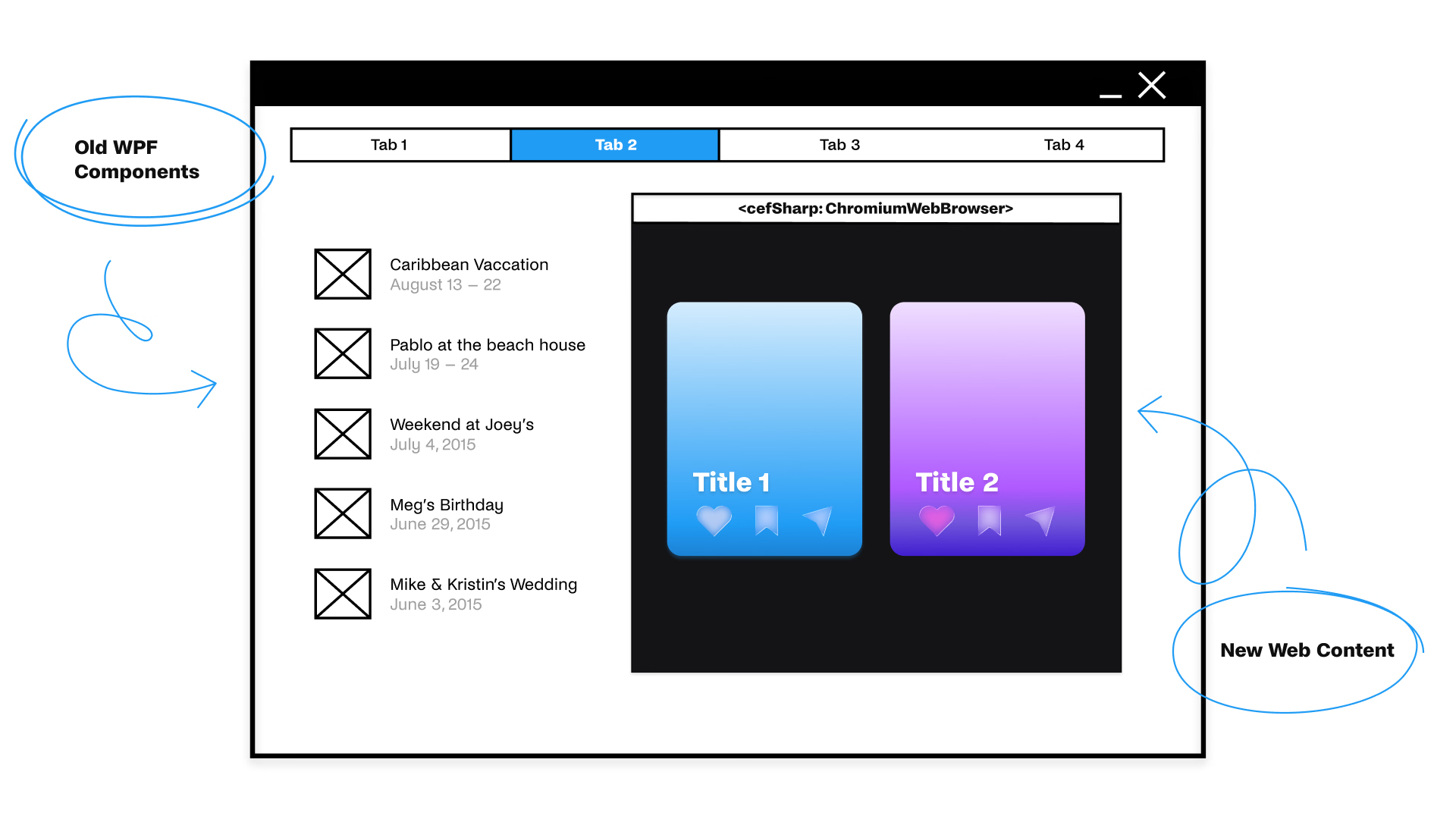
From the user’s point of view, nothing dramatic changes – and that’s exactly the point.
They still open the same desktop application they’ve used for years. The navigation, menus, and workflows behave as before, so there’s no new tool to learn, no retraining, no friction.
But something feels different.
Screens start to load faster, animations make interactions smoother, and data updates appear in real time. Subtle transitions, responsive layouts, and interactive dashboards bring a sense of modern fluidity that users recognize from web and mobile experiences.
Behind the scenes, these improvements come from embedded web components — built with frameworks like Angular or React and rendered directly inside the desktop app. They enable richer visuals:
- dynamic charts and visual analytics,
- real-time dashboards,
- smooth transitions and micro-animations,
- layouts that adapt to different screen sizes and resolutions.
- The best part is that modernization happens gradually.
As more modules adopt the new design system, the entire application begins to feel like a modern web app — yet it never left its native environment.
The result:
A familiar tool that suddenly feels faster, fresher, and more enjoyable — all without disrupting daily work.
The Business Perspective – Continuity with a Future
From a business standpoint, this approach offers the best of both worlds: progress without interruption.
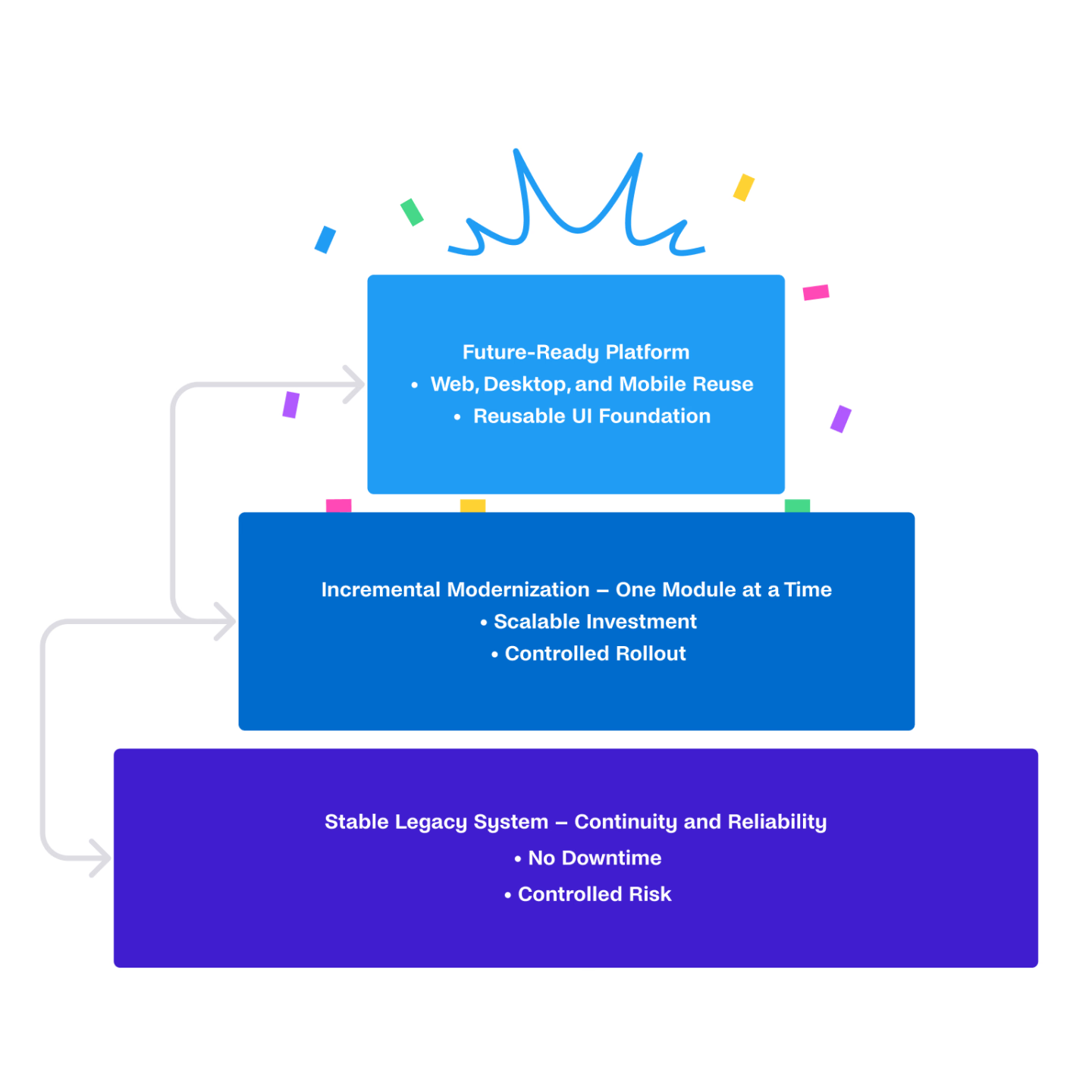
The existing system remains fully operational while modernization unfolds gradually in parallel. Production doesn’t stop; teams don’t pause, and users stay productive throughout the transition.
Because the old and new layers coexist safely, the modernization effort carries controlled risk. Critical functions continue to run on the stable legacy core, while new features are introduced and tested step by step. This means no big-bang release, no downtime, and no loss of business continuity.
Investment is scalable.
Organizations can modernize one screen, one feature, or one workflow at a time, aligning technical progress with budget cycles and strategic priorities. Each incremental step delivers visible value – improving usability, performance, or maintainability – while keeping the overall system stable.
And once UI modules are built with web technologies, they form a future-ready foundation.
The same components can later run in a browser, on tablets, or inside Electron or Photino shells – giving companies freedom to expand to new platforms without another full rewrite.
The result: modernization that’s not a project, but a sustainable process – bridging today’s reliability with tomorrow’s possibilities.
Embedding Web UIs in Legacy WPF Applications
In many industrial or enterprise environments, rewriting a large desktop application from scratch is simply not an option. The system has to stay online, production lines must continue running, and downtime costs more than technical debt. That’s where embedding a modern web interface inside an existing desktop shell becomes a practical and elegant modernization path.
Chromium Embedded Framework and CefSharp
At the heart of this approach lies the Chromium Embedded Framework (CEF) – an open-source project that allows developers to use the Chromium browser engine (the same one used in Google Chrome) as a lightweight embeddable component in other applications. CEF provides APIs for rendering HTML, CSS, and JavaScript content and for enabling bidirectional communication between native code and the browser process.
For .NET developers, CefSharp acts as a managed wrapper around CEF. It provides a native WPF or WinForms control (ChromiumWebBrowser) that can be seamlessly embedded in any existing .NET UI. CefSharp handles the low-level communication between the .NET runtime and the Chromium process, exposing convenient APIs for navigation, JavaScript evaluation, message routing, and resource loading.
Hosting the Web Application
There are two main strategies for hosting web content inside the embedded browser:
- Local (packaged) hosting – the SPA (React, Angular, Vue, etc.) is built and distributed together with the application binaries. The generated HTML, JS, and CSS files are placed in the application’s installation directory and loaded through a local file:// or custom:// scheme. This approach ensures offline operation, which is critical for industrial HMIs and field devices.
- Remote hosting – the web app is deployed on a web server (internal or cloud-based), and CefSharp loads it through a standard HTTPS URL. This allows continuous updates of the web layer without redeploying the desktop shell, which is ideal for enterprise dashboards or service tools connected to corporate networks.
Embedding CefSharp in WPF
From a WPF perspective, the integration is straightforward. The CefSharp ChromiumWebBrowser control is placed inside an existing WPF window or user control, just like any other UI element. Developers can then navigate to a URL (local or remote) and attach event handlers for page load, error handling, or custom message routing.
Under the hood, CefSharp runs a separate Chromium subprocess responsible for rendering and script execution. This isolation improves stability – if the web view crashes, the host application remains alive. It also allows fine-grained control over GPU acceleration, sandboxing, and cache directories via the CefSettings configuration during initialization.
When integrating CefSharp into a large legacy system, the key design question is how to manage the lifecycle and inter-process communication (IPC) between .NET and JavaScript efficiently – so that the embedded SPA behaves as a natural part of the application rather than a foreign widget.
Communication Between .NET and JavaScript
CefSharp provides several mechanisms for bidirectional communication between the .NET host and the JavaScript context inside the browser:
- JavaScript binding:
NET objects can be registered and exposed to the JS runtime. JavaScript code can then call these methods as if they were local. For example, the JS frontend might call window.appBridge.getMachineStatus(), which internally invokes a .NET method returning data from the backend service layer. - JavaScript evaluation:
The .NET side can execute JS code directly using methods like EvaluateScriptAsync to trigger frontend actions, send data, or manipulate the DOM. This is often used for UI synchronization or event notification from the desktop to the web part. - Message router (IPC bridge):
For more structured data flow, CefSharp includes a message routing system that enables JSON-based message exchange. This allows building a consistent IPC layer with defined request/response patterns or event streams. Many teams abstract this into a lightweight messaging protocol so both sides can evolve independently.
This IPC bridge is what turns CefSharp integration from an experiment into a maintainable architecture. It allows the legacy C# codebase to continue performing core operations – data processing, hardware communication, database access – while the web layer focuses on presentation, animation, and UX evolution.
Benefits and Caveats
The biggest advantage of this approach is gradual modernization with minimal risk. Teams can keep their stable and validated .NET backend logic, integrate new React or Angular components incrementally, and deploy improvements continuously – without disrupting production environments.
Other benefits include:
- Reusing backend and business logic already tested and trusted.
- Modern web UX with responsive design, animation, and reusable components.
- Step-by-step migration path toward a fully web-based or cross-platform system.
However, there are also some important caveats:
- Memory footprint: Chromium is a full browser engine and adds measurable overhead compared to native XAML components.
- Styling consistency: Matching fonts, colors, and DPI scaling between WPF and HTML requires design coordination.
Despite these trade-offs, embedding a browser engine via CefSharp remains one of the most practical modernization techniques for WPF and WinForms ecosystems – especially when time, risk, or hardware limitations prevent a full rewrite.
Beyond CefSharp – Other Modernization Paths
While embedding modern web components through CefSharp is an ideal solution for extending existing desktop applications, it’s not the only route toward a sustainable modern UX.
Depending on the target platform, performance needs, and hardware environment, there are other viable options – each following the same core philosophy.
Photino.Net — Lightweight by Design
For embedded or industrial devices where memory and processing power are limited, Photino.Net offers a more compact alternative.
It runs on the system’s native WebView engine (Edge WebView2 on Windows, WebKit on Linux/macOS) and doesn’t require Node.js or the full Chromium runtime.
This makes it especially suitable for machine interfaces, controllers, and kiosks where every megabyte matters.
Photino applications keep the same structure as CefSharp-based ones – a .NET backend and a web-based frontend – but with a significantly smaller footprint and faster startup time.
Ideal for industrial systems that need modern visuals without the overhead of a full desktop browser engine.
Electron – Full Cross-Platform Experience
If the goal is to distribute a fully independent, cross-platform application, Electron remains a strong choice.
It wraps a complete Chromium and Node.js runtime, allowing developers to reuse web technologies (HTML, CSS, JS, Angular, React, Vue) and deliver native-like desktop experiences across Windows, macOS, and Linux — from a single codebase.
Electron is especially appealing when:
- the legacy app cannot be reused,
- offline support is essential,
- or deployment on multiple operating systems is required.
Its ecosystem also provides mature tools for auto-updates, packaging, and integration with native OS features like notifications, menus, and file dialogs.
One Core Principle
Despite their differences, CefSharp, Photino.Net, and Electron all share one essential principle:
- Separate logic from presentation and evolve the UX step by step.
Each approach allows teams to decouple the heavy backend from the modern frontend, ensuring flexibility for future platforms — whether desktop, browser, or mobile.
Modernization is not about replacing the old; it’s about building bridges that make evolution continuous, safe, and scalable.
The New UX Continuum
The result is a continuous UX ecosystem where the same application logic and data flows power multiple contexts:
- The machine HMI on an embedded Windows device.
- The supervisory dashboard on an engineer’s desktop.
- The remote overview on a manager’s iPad or phone.
Users no longer switch between separate tools — instead, they experience a consistent interface that scales from a 7-inch panel to a 27-inch monitor.
For software teams, this approach means a single codebase, modular deployment strategy, and unified security layer — the core principles of sustainable modernization.
Conclusion – Several Paths, One Goal: Sustainable Modern UX
There’s no single route to modernization – but the goal is the same: a consistent, future-proof user experience built on reusable architecture and modern web technologies.
- CefSharp helps bridge old and new, embedding web UIs into existing WPF systems without disrupting proven .NET backends.
- Electron extends that idea to a universal, portable runtime for cross-platform desktop apps, unifying web and native experiences.
- Photino.NET brings modern UX to embedded and industrial devices, offering the same web capabilities with minimal footprint and native .NET performance.
Looking ahead, micro-frontends add another layer of flexibility — allowing modular, independently deployable UI components that can coexist across hosts and platforms.
Whether on a machine panel, desktop, or tablet, these approaches lead toward one shared vision:
sustainable, adaptable, and truly modern UX — built once, running everywhere.